


Free LLMs.txt Generator
Your website might be invisible to AI search engines not because your content is bad, but because AI models can’t efficiently parse HTML, JavaScript, and cluttered page layouts.
By the time ChatGPT or Perplexity extract your actual message from all the navigation bars, pop-ups, and design code, they’ve wasted their limited context window.
An llms.txt file solves this by giving AI models a clean, structured overview of your website, but creating one manually takes hours.
Our free llms.txt generator does it in seconds. Just enter your URL and get a complete, AI-optimized file ready to upload.

How to Use the Free LLMs.txt Generator
Type your domain in the input field. You can enter:
- Full URLs: https://yourdomain.com
- Simple domains: yourdomain.com
- Subdomains: blog.yourdomain.com
The generator will automatically crawl your site to extract:
- Your brand name and tagline
- Business description from your homepage
- Key pages across your site
- Page titles and meta descriptions
Hit the Generate button and the tool immediately gets to work. You’ll see a live progress indicator showing exactly what’s happening in real-time:
- Fetching website and analyzing metadata
- Discovering and crawling internal pages
- Categorizing content structure
- Generating AI-optimized llms.txt
For small websites, this completes in under 5 seconds. Larger sites with more pages can take up to 15 seconds. Either way, you’ll see exactly where it is in the process the whole time.
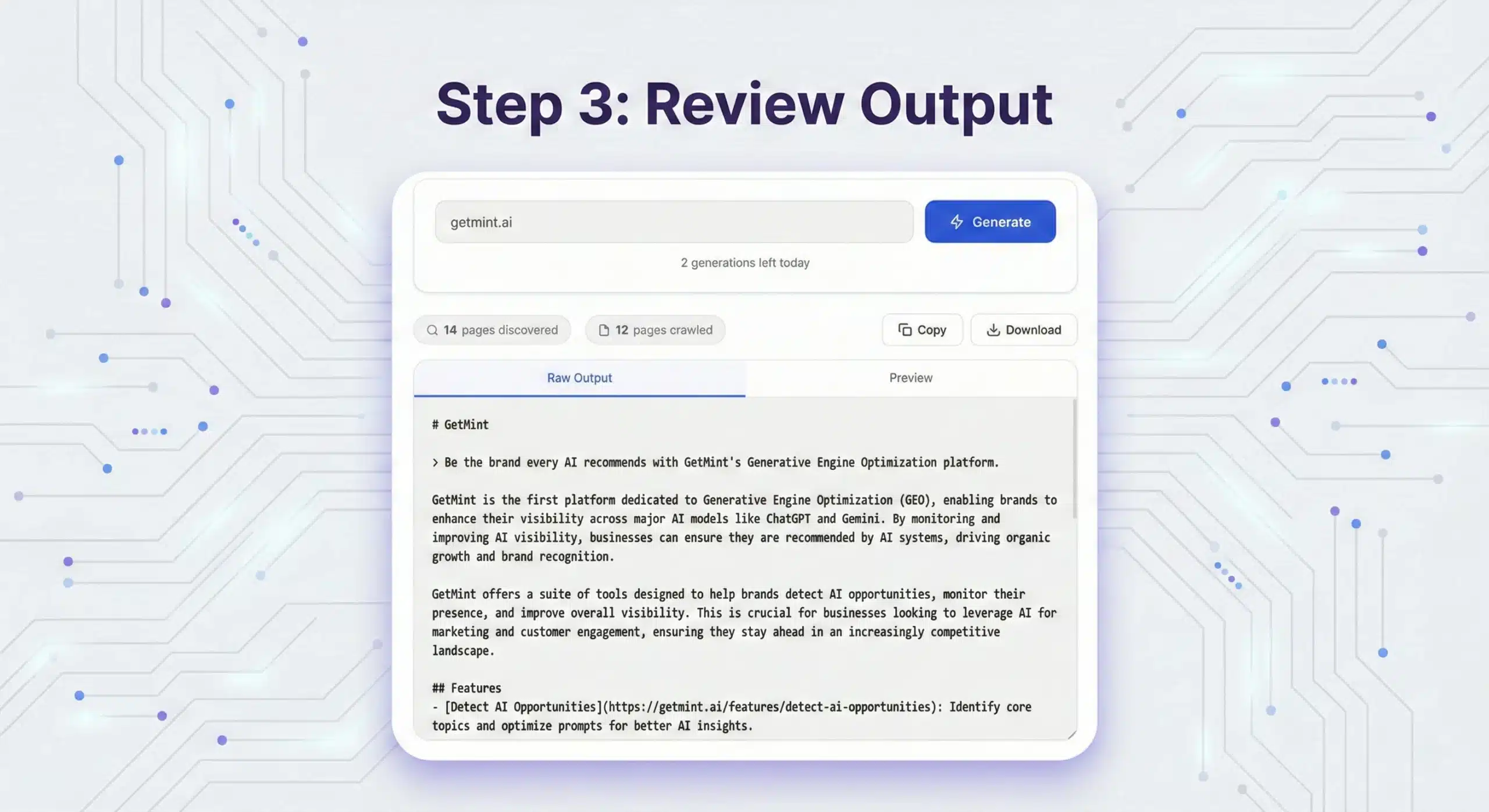
Once generation is complete, you’ll see two things at the top: pages discovered and pages crawled. That’s a quick summary of how much of your site the tool processed.
When you’re happy with the output, you have two options:
- Click Copy to instantly copy the raw text into your clipboard and paste it straight into a text editor or your hosting panel.
- Click Download to save a ready-to-upload file named llms.txt. No renaming needed, just upload it directly to your server root.
What the LLMs.txt Generator Creates
A well-structured llms.txt file follows a specific format that AI models understand instantly. It produces a file using Markdown that includes:
1. Brand Header (H1)
The top of the file starts with your brand or company name in markdown heading format:
This is the only required element in an llms.txt file. AI models read this first to understand whose website they’re analyzing.
2. Tagline (Blockquote)
This is a one-sentence summary of what your business does:
This blockquote formats signals to AI that this is your core value proposition. Keep it under 20 words for maximum clarity.
3. Business Description
This section explains your business, audience, and what makes you different. It’s where AI models learn the context they need to cite you accurately. It’s usually 2 to 4 paragraphs long.
Here’s what it looks like:
4. Organized Sections (H2 Headers)
Your pages are grouped into logical categories.
This organization helps AI models understand the structure of your content and find relevant information quickly.
5. Link Lists with Descriptions
Under each section, individual pages are listed with:
- Clickable title
- Direct URL
- Brief description of what users can learn or do on that page
The descriptions, although optional, are very important for AI models. Don’t write “Information about our product.” Write “Step-by-step guide to setting up your first project under 5 minutes.” Specificity helps AI models understand when to cite each page.
Why Use an LLMs.txt Generator?

Creating an llms.txt file manually is possible, but it’s time-consuming.
Can You Manually Edit the Generated LLMs.txt File?


Our generator does 90% of the work, but you should customize the output before downloading. The Raw Output tab is a fully editable text area; just click anywhere in it and start typing.
Since the file is plain markdown, editing is straightforward even if you’ve never written markdown before:
Edit Your Brand Header and Tagline
The first line is your brand name formatted as # YourBrand. The second line is your tagline formatted as > Your tagline here. Just click and overwrite them with anything more accurate.
Edit or Add Page Descriptions
Each link follows this format:
Find any link and rewrite its description to be more specific and useful for AI models. Or add entirely new links by copying that format and pasting a new line.
Add or Remove Sections
Sections are just markdown H2 headers:
To add a new section, type ## followed by your section name, then add links beneath it. To remove a section, simply delete those lines.
Reorder Pages

Cut and paste lines to move pages around. Since AI models read the file top to bottom, put your most important pages first within each section.
Once you’re done editing in the Raw Output tab, switch to Preview to see how it looks rendered, then hit Download or Copy when you’re satisfied.
Where to Upload Your LLMs.txt File
After downloading, you need to host the file at your domain root so AI crawlers can find it automatically.
Direct Server Upload
For those with access to their hosting control panel.
public_html (or www, httpdocs)
llms.txt to the root directory
https://yourdomain.com/llms.txt
WordPress Plugin
For WordPress users without direct hosting access.
llms.txt file
Some WordPress themes now support llms.txt natively in their settings panel.
Developer Assistance
Send the file to your dev team with these instructions.
yourdomain.com/llms.txt
Subdirectory llms.txt Files
You can place llms.txt files in specific subdirectories to give AI models focused information about particular sections. For example, a dedicated file for your docs at /docs/llms.txt would only list technical pages — no marketing clutter.
Use subdirectory files for:
Is the LLMs.txt File Important?
The llms.txt file format was proposed by Jeremy Howard in September 2024 as a standard way for AI models to efficiently understand websites.
It’s like robots.txt (which tells crawlers what they can’t access) but for AI (telling them where the best information lives).
AI models need this because modern websites are incredibly complex. A typical homepage includes:
- HTML structure
- CSS for design
- JavaScript for interactivity
- Navigation menus with 20+ links
- Footer content with legal pages and social links
- Pop-ups, cookie banners, and chat widgets
- Tracking scripts and analytics code
By the time an AI models strips away all this clutter to find your actual message, it’s wasted a huge portion of its context window (the amount of text it can process at once).
An llms.txt file gives AI models a clean shortcut: here’s who we are, what we do, and where to find specific information. No parsing required.
As of early 2026, llms.txt is still an emerging standard rather than a mandatory requirement. However, companies such as Anthropic, Perplexity, Vercel, Zapier, and Hugging Face are already using it. This means:
- AI models don’t require llms.txt files to crawl your site.
- Most LLM providers haven’t publicly confirmed that their models actively use it.
- However, early adopters may see better AI visibility as the standard becomes mainstream.
Google hasn’t officially endorsed llms.txt for traditional search rankings, and search advocate John Mueller noted that it’s not currently a ranking factor.
However, that doesn’t mean it’s useless. It’s specifically designed for AI search engines like ChatGPT, Claude, and Perplexity, not traditional Google Results. Generating the file takes almost no effort. Should it gain traction, you’ll enjoy early visibility; if not, you’ve still future‑proofed your site with a harmless addition.
AI Search Is the New Gatekeeper of Discovery
If you’re invisible in AI answers, your competitors are capturing customers you’ll never reach.


What happens if you ignore AI search
Risk of being invisible
When prospects ask AI "What's the best [your category]?", your competitors appear in responses while you don't exist.
Speed of market shift
Every day you're not visible in AI search, your competitors capture qualified prospects who will never discover you.
Data blackbox
You have no visibility into how AI models perceive your brand, what they say about you, or when they recommend competitors instead.
Revenue leakage
50% of your potential customers are using AI to research purchases. If you're invisible there, you're losing half your market.


Ready to turn AI search into growth?
Frequently Asked Questions

Yes, completely free with no signup, credit card, or email required. Generate unlimited files for as many domains as you need.

Absolutely. The downloaded file is plain text in markdown format. Open it in any text editor (Notepad, TextEdit, or VS Code) and make changes before uploading to your server.

The official llms.txt specification recommends creating clean markdown (.md) versions of your key pages and linking to those.
However, if that's not feasible, linking directly to your HTML pages still works, but make sure those pages aren't cluttered with excessive navigation, pop-ups, or JavaScript.
Most users link directly to their existing HTML pages and see good results.

Update whenever you:
- Launch new products or major features
- Restructure your website navigation
- Add significant content (new documentation, case studies, etc.)
- Rebrand or change your core messaging
- Notice AI models describing you inaccurately
A quarterly review is a good baseline practice.

Not directly. Google has not officially listed llms.txt as a ranking factor for traditional search results. This file is designed for AI search engines (ChatGPT, Claude, Perplexity, and Gemini), not traditional SEO.
However, improving AI visibility often leads to indirect SEO benefits: more brand searches, more backlinks from content that cites you, and increased authority.

Yes. The two files serve different purposes:
- sitemap.xml lists every page on your site for traditional search engines (comprehensive inventory)
- llms.txt highlights your most important pages for AI models (curated "best of")
Use both.

The generator automatically identifies your most important pages based on:
- Homepage prominence
- Internal linking structure
- URL hierarchy
- Meta descriptions and titles
For sites with 500+ pages, the generator might not capture everything. Edit the raw output tab to:
- Add any critical pages it missed
- Remove low-priority pages it included
- Reorganize sections to match your information architecture
You can also create multiple llms.txt files for different subdirectories (see "Subdirectory llms.txt Files" section above).
