


Major AI models now receive over 1.6 billion visits every month, creating a massive discovery channel that traditional analytics can’t fully measure.
While Google Analytics might show you the referral traffic from users who click, it remains blind to the “zero-click” conversations. You have no way of knowing how many times ChatGPT recommended your product, or worse, if it’s warning users to avoid you.
This GetMint review breaks down how our platform captures that missing data We’re the first dedicated solution for Generative Engine Optimization (GEO), designed to measure the citations, mentions, and sentiment that traditional SEO tools simply can’t see.
What Is GetMint?
GetMint is an analytics and optimization platform built specifically for AI search. While legacy tools like Ahrefs or Moz focus on backlinks (links from other websites to yours), GetMint focuses on citations and mentions (references inside AI answers).
It monitors most Large Language Models (LLMs), including ChatGPT, Perplexity, Claude, Gemini, and Google AI Overviews (AIO), to answer three specific questions that traditional software cannot:
- Frequency: How often are you being recommended when users ask about your industry?
- Context: Is the AI describing your product accurately, or is it hallucinating features you don’t have?
- Sentiment: Is the AI acting as a promoter or a detractor for your brand?
GetMint is built for brand leads and SEO strategists who realize that “ranking #1 on Google” is no longer the only metric that matters when 1.6 billion monthly users are getting their answers from AI.
GetMint’s Features
GetMint features several tools that close the loop between data and action. It guides you from a high-level diagnosis of your visibility down to the specific content fixes required to improve it.
1. Visibility Dashboard
The first thing you see is the GetMint Score (0 to 100). This aggregates your visibility, sentiment, and brand alignment into a single health metric giving you an overview of your brand’s AI presence.
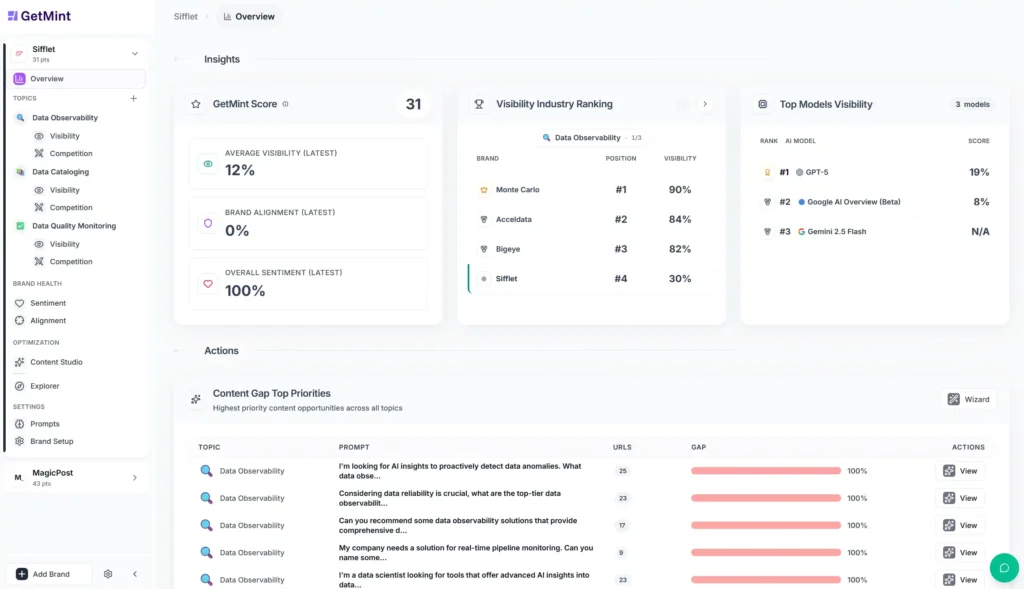
While traditional SEO tools track static rankings (e.g., “You’re #3 for keyword X”), GetMint measures probability. Because AI models are non-deterministic (they give different answers to different users), GetMint runs simulations to calculate your visibility score.
The visibility score is the percentage of times your brand appears in the answer for a specific user need. The primary metrics it tracks are
- AI mentions: Unlinked references where the AI recommends your brand by name. This is an “awareness” signal.
- AI citations: Linked references where the AI uses your content as a source. This is a “trust” signal.
- Share of voice: Your visibility relative to the specific competitors you selected during brand setup.
Don’t treat the AI as one channel. Look at how the brand has 32% visibility on GPT-5 but only 3% on Gemini. This means your content is optimized for OpenAI’s training data but is failing to penetrate Google’s ecosystem. Use this insight to shift your PR strategy towards what Gemini favors.
Pro Tip: Below the high-level metrics, the dashboard includes a prioritized content gap list. It identifies high-value prompts where you have low visibility and your competitors are winning. This turns the dashboard from a passive report into a daily to-do list.
2. Generative Share of Voice
The “visibility” score tells you how you’re doing in a vacuum. The Share of Voice is akin to your market share. It tells you who’s winning in the market.
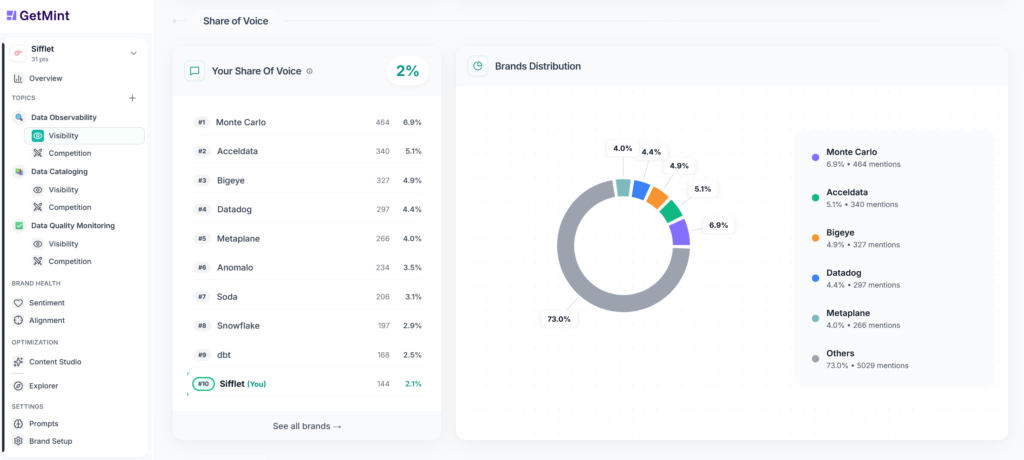
Traditional tools measure share of voice by counting hashtags or backlinks. GetMint measures it by citation frequency and mention volume within AI answers. For example, in the screenshot above, the brand (Sifflet) has a 4% share of voice, while the market leader (Monte Carlo) has 11%. They’re getting nearly 3x the “at-bats” with potential customers.
The Brands Distribution pie chart visualizes the fragmentation of your market.
If the chart is split evenly among 10 players, the market is open for the taking. But if one competitor eats 60% of the pie, your strategy needs to shift from “awareness” to “differentiation” (explaining why you’re different from the giant).
Pro Tip: That purple “Others” slice in your market share graph often hides publisher sites (like G2, Capterra, or “Top 10” lists) rather than direct competitors. If you don’t dig deeper, you might waste time trying to rank your homepage when you should be trying to get featured in a directory.
3. Competitive Intelligence
The share of voice chart tells you who’s winning, but it doesn’t tell you how. To understand the “why,” you need to look at the qualitative data. You need to know exactly why the AI prefers your competitors (or the directories citing them) over you.
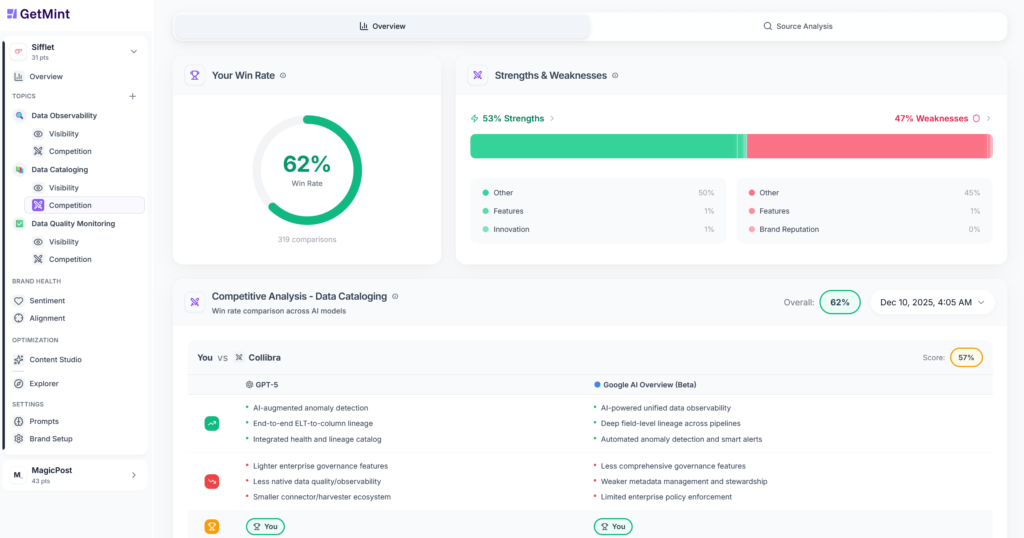
The “Competitor” section functions like an automated focus group. It reads thousands of AI responses to extract the consensus view of your market.
SWOT Analysis
At the top of the dashboard, the Common Patterns widget aggregates the qualitative data.
- Common Strengths: It identifies the specific selling points AI models consistently repeat about your competitors (e.g., “intuitive user interface” or “AI-native anomaly detection”).
- Common Weaknesses: It flags the recurring negative themes (e.g., “complex initial setup” or “limited scalability”).
This is instant product feedback. You can see exactly where your competitors are vulnerable and adjust your own messaging to attack those gaps.
Model-by-Model Comparison
Below the high-level patterns, GetMint gives you a granular, side-by-side breakdown of you vs. competitor X across every specific model.
AI models have different personalities in their training data. For example, Claude 4 could praise your competitor for “fast setup,” whereas Gemini flags “potential integration challenges.” This allows you to tailor your PR strategy for specific platforms.
Source Analysis
This is the most tactical feature for SEOs. The Source Analysis tab lists the exact domains and URLs that AI models are citing to support your competitor’s claims.
If Perplexity is recommending your competitor because of a specific TechCrunch article or a G2 review, GetMint identifies that specific URL. This gives you a target list for your own digital PR and backlink outreach.
Pro Tip: In the Sources Explorer, look for high-authority domains (like Gartner) that are driving visibility for your competitors but not for you. If a specific domain is feeding the AI positive sentiment for your rival, getting a mention on that same domain is the fastest way to change the AI’s mind about you.
4. Brand Sentiment
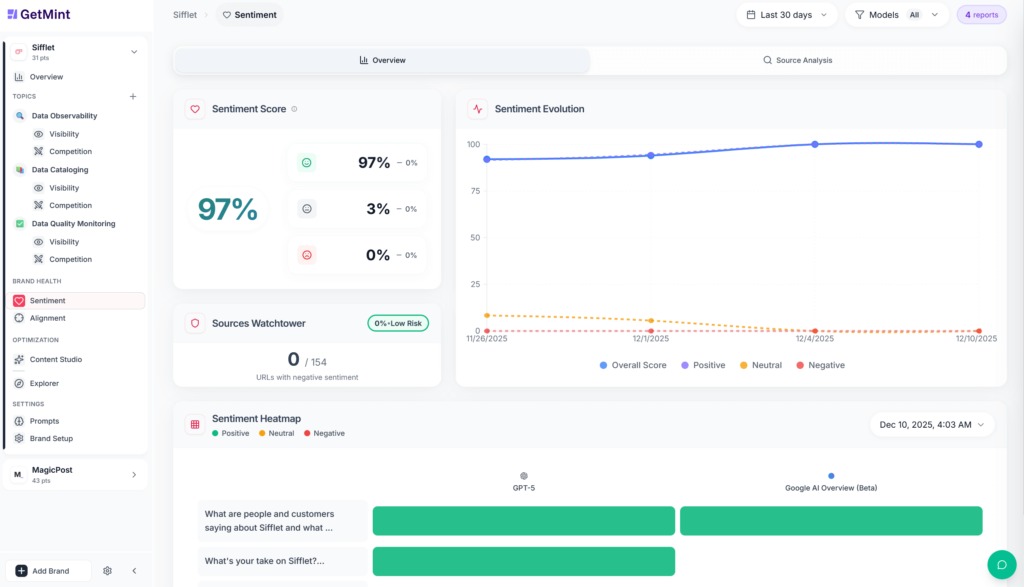
High visibility isn’t helpful if the AI is telling your customers not to buy from you. The Brand Sentiment module is your quality control system. It answers the question, “When the AI talks about us, is it helping or hurting?”
Sentiment Score
GetMint aggregates the tone of every mention into a single Sentiment Score (Positive % – Negative %).
This is your early warning system. If your score dips from “Excellent” to “Medium,” you know an AI model has ingested negative news or a bad review, and you need to intervene.
Sentiment Heatmap
This visualization breaks down the sentiment by model (rows) and prompts (columns).
AI models are trained on different data. You might be “green” (positive) on GPT-5 but “red” (negative) on Gemini because Google is indexing a specific negative Reddit thread that OpenAI ignores. The heatmap isolates exactly which platform is the problem.
Sources Watchtower
Below the metrics, the Sources Watchtower lists the specific URLs that are driving negative sentiment.
If the dashboard shows “3 URLs with negative sentiment,” you can click to see exactly which blog posts or reviews are poisoning the well. This gives your PR team a hit list of sites to contact or bury with fresh positive content.
Pro Tip: Click on any cell in the heatmap to open the Detailed Analysis view. This reveals the AI’s response. Use this to catch hallucinations. If the AI says your product is “expensive” but you recently lowered prices, that’s a hallucination caused by old training data. Use this proof to justify a content refresh campaign to update the model’s knowledge.
5. Brand Alignment
This capability separates the “vanity metrics” from business value. High visibility and positive sentiment won’t work in your favor if the AI fundamentally misunderstands what you sell.
If ChatGPT tells a prospect that your enterprise security platform is a “free tool for freelancers,” you’re losing a deal and damaging your market positioning.
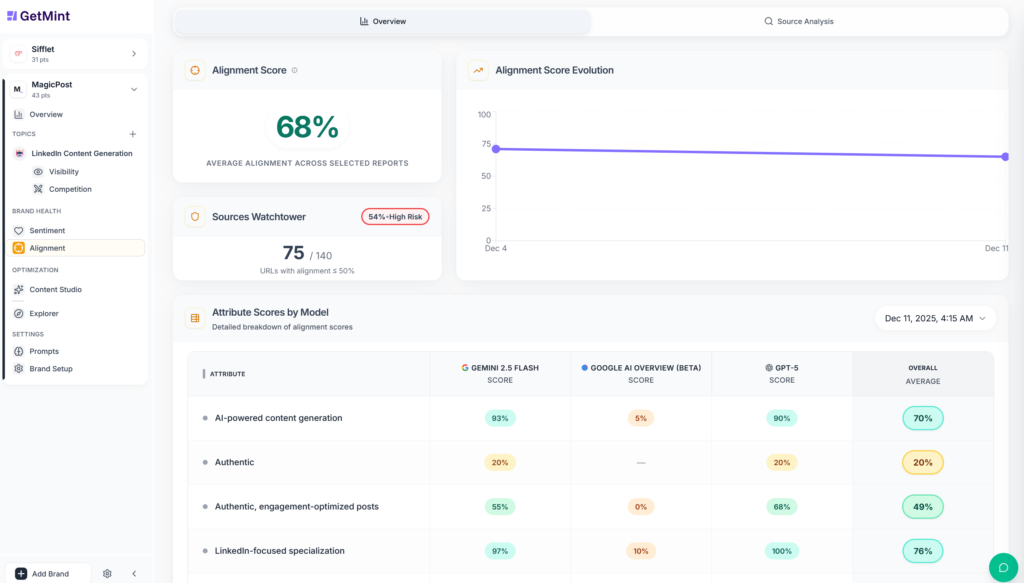
Brand Alignment solves this by auditing the AI’s understanding of your value proposition.
During the brand setup process, you define up to five attributes you want your brand to be known for. These are concepts like “scalable,” “transparent,” or “holistic.”
GetMint then analyzes thousands of generated responses to calculate an Alignment Score, which measures how often these specific concepts appear when the AI explains your brand.
Model-by-Model Breakdown
The dashboard gives you more useful information. In the example above, the brand has a solid 72% alignment score, but the breakdown shows that while GPT-5 strongly associates the brand with being “holistic” (85%), Google’s Gemini lags behind (68%).
This means that OpenAI understands your value proposition, but Google’s training data is missing that context. To fix this, the marketing team needs to prioritize publishing content about their “holistic” approach on sites indexed heavily by Google.
Sources Watchtower
When the score drops, the Sources Watchtower tells you exactly who’s to blame. It flags the specific third-party URLs that are feeding the AI “misaligned,” “partially aligned,” and “aligned” descriptions.
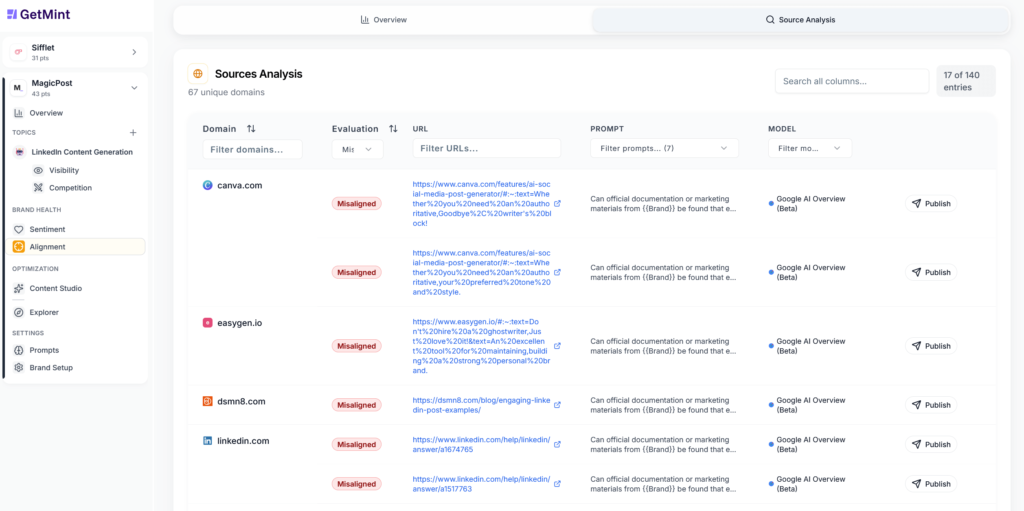
If the dashboard flags a blog post or an outdated review as “Misaligned,” it means that specific page is confusing the AI. This gives your PR and SEO teams a precise hit list of sources to update, correct, or outrank to get your messaging back on track.
6. Content Studio
This is the feature that separates GetMint from a passive analytics tool. Usually, when you find a content gap, you have to export the data, go to a separate AI writer (or a human team), and guess what to write to fix it.
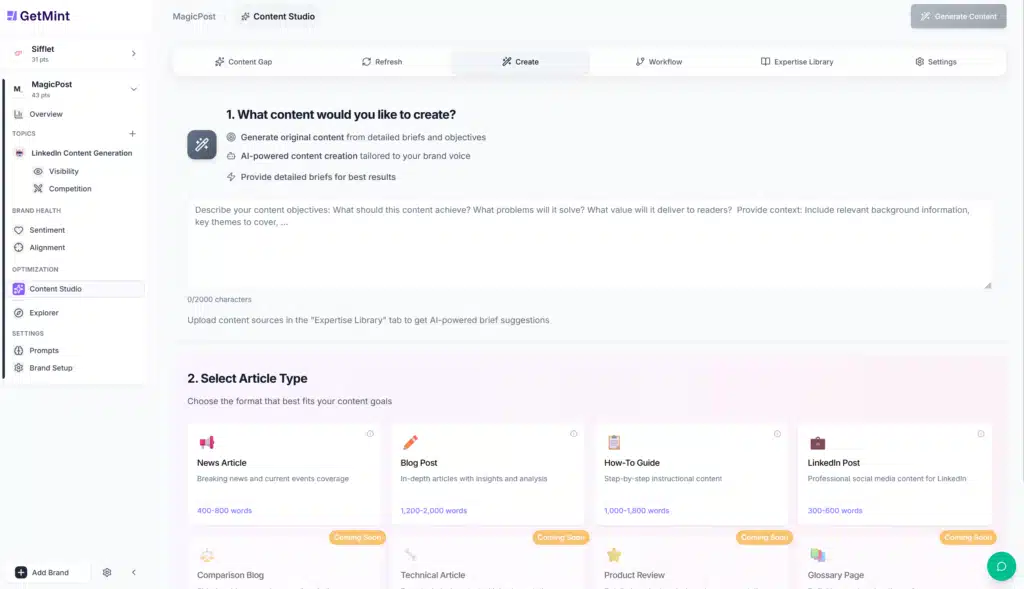
GetMint closes the loop inside the platform. It identifies the missing prompt and helps you build the specific asset needed to rank for it. The process is simple:
- The dashboard flags specific prompts where your brand isn’t mentioned (e.g., “What are the best data observability tools for startups?”).
- Next to the missing prompt, there’s a “Generate Content” button.
- The studio analyzes the URLs consulted by the AI for that specific query (the sources that are currently winning) and drafts a piece specifically engineered to compete with them. It uses the RAG (Retrieval Augmented Generation) framework to ground the content in the listed sources and your expertise library.
You have complete control over the drafting process. GetMint comes with a ChatGPT-like chat interface that lets you edit specific sections as needed.
Expertise Library
One of the biggest risks of AI content is generic fluff. GetMint solves this with the Expertise Library.
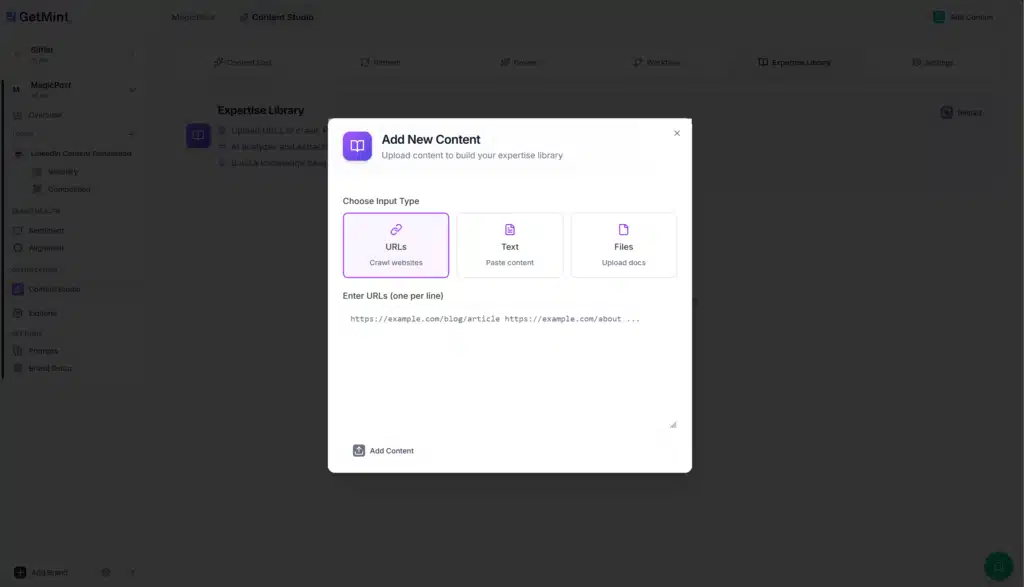
You upload your own PDFs, whitepapers, and technical documentation. When the Content Studio generates a draft, it references your actual data and features. This guarantees that the output is factually accurate and highly unique (AIs prioritize this for citations!).
Content Personas
You can define specific Personas (e.g., “technical engineer,” “CMO,” “friendly guide”) to ensure the output matches your brand voice.

This prevents the robotic “AI accent” that often gets content penalized by Google, as the tone parameters help you adjust the writing style until it fits your brand voice.
Kanban Workflow
GetMint’s Content Studio includes a built-in project management board (Brief → Structure → Processing → Draft → Validated → Published) that lets your team manage the production lifecycle directly within the tool without jumping to Trello or Asana.

Pro Tip: You don’t always need new content. The “Refresh Content” feature allows you to select an existing article on your site and repurpose it into a new format (like a comparison table or an FAQ list) that’s more likely to be picked up by an AI model.
7. Explorer
If the dashboard is the “executive summary” for your CMO, the Explorer is the raw database for the analyst.
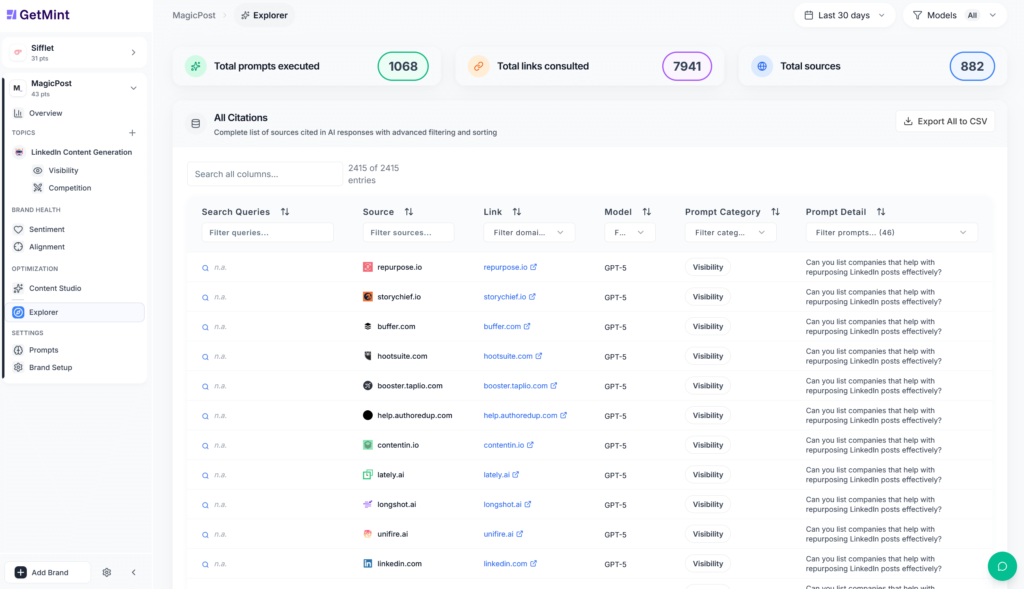
This tab provides complete transparency into the data GetMint collects. Here, you can:
- Search through thousands of executed prompts to see the exact raw text of how the AI responded to specific queries.
- Trace the breadcrumbs to find the exact URL the AI “clicked” to formulate its answer.
- See exactly what articles the models found so authoritative to learn what kind of content you need to write to steal that citation.
You aren’t locked into the platform. The “Export All to CSV” button allows you to pull the raw citation data to run your own offline analysis or merge it with your internal BI tools (like Looker or Tableau).
GetMint’s Pricing
GetMint is priced as a strategic B2B platform. While there’s a free tier to run a quick audit, ongoing monitoring and optimization require a subscription. Here’s the breakdown of the monthly plans:
| Feature | Starter | Growth | Enterprise |
|---|---|---|---|
| Price | €99/mo | €299/mo | €549/mo |
| Best For | Startups/Solopreneurs | SMEs/Marketing Teams | Agencies/Global Brands |
| AI Engines | 3 | 4 | 10 |
| Topics | 2 | 9 | Custom |
| Prompts Tracked | 50 | 200 | Custom |
| Content Credits | 300 | 1,000 | Custom |
| Team Seats | 1 User | 5 Users | Custom |
| Countries | 1 | 2 | Custom |
| Support | Priority Email | Dedicated Manager |
Pricing Note: You save 20% by billing annually.
The main difference between Starter and Growth is the scope of your content strategy.
- Starter (2 Topics): Designed for a single product line or a specific campaign. If you only need to win visibility for “Project Management Software” and “Task Management,” this plan works perfectly.
- Growth (9 Topics): Designed for a full website strategy. If you have a blog covering multiple pillars (e.g., “HR Tech,” “Remote Work,” “Payroll,” and “Recruiting”), you’ll hit the 2-topic limit on Starter quickly. The Growth plan opens up enough capacity to map your entire site architecture.
GetMint Pros and Cons
To be completely objective, here’s where GetMint excels and where it might not fit your specific needs compared to legacy tools.
Pros
- ✅ Content studio: Most tools just show you a graph of your decline. GetMint’s content studio allows you to fix the problem directly in the platform by generating optimized content based on the winning sources.
- ✅ Qualitative insights: The competitive intelligence features (SWOT analysis) provide qualitative insights (e.g., “Competitor X is seen as cheap but buggy”) that traditional rank trackers simply can’t see.
- ✅ Full platform coverage: GetMint tracks the entire ecosystem. Not just Google AIO, but the conversational engines (ChatGPT, Perplexity, Claude, Grok, etc.) where B2B buyers are actually doing deep research.
- ✅ Brand health: The sentiment feature goes beyond positive/negative. The brand alignment score is unique in the market and lets you see if the AI actually understands your value proposition.
Cons
- ❌ No social listening: GetMint doesn’t track X (Twitter), TikTok, or Reddit threads directly. It tracks how AI models interpret those threads. If you need raw social media monitoring, you’ll still need a tool like Brandwatch.
- ❌ Prompt limits: If you’re used to tracking 10,000 keywords for $99 in a standard rank tracker, GetMint’s limits will feel low. This is because simulating AI prompts is computationally expensive. You have to be strategic about what you track, rather than dumping in a massive keyword list.
- ❌ Tracks influence, not clicks: Getmint tracks visibility and citations, not website traffic. While Google Analytics can track the specific users who click a link, it can’t measure the thousands of users who saw your brand recommended but didn’t click (zero-click visibility).
Final Verdict: Should You Use GetMint?
The search landscape has split in two: search engines like Google and answer engines powered by AI. Traditional SEO tools only measure half the world. GetMint measures the whole picture.
If your mission is to prove brand value to the board, close the visibility gap in ChatGPT, and stop guessing what content to create, GetMint gives you the intelligence and tools to do it.
But GetMint isn’t for everyone. If your focus is on local map rankings or bulk keyword tracking at the lowest cost, traditional SEO platforms are your best bet.
This GetMint review showed you that the platform is built for brand leaders, CMOs, and strategists ready to tackle the biggest shift in search history and win in both worlds. If you fit the profile, start your free AI visibility audit today and see exactly what the AI models are saying about you.
Frequently Asked Questions
How is GetMint different from Semrush or Ahrefs?
Semrush and Ahrefs are built for search engines; GetMint is built for answer engines. Traditional SEO tools crawl static websites to track keyword rankings. GetMint monitors dynamic Large Language Models (LLMs) to track citations and mentions.
While SEO tools tell you if you’re on page 1 of Google, GetMint tells you if ChatGPT is recommending your brand to a user.
Does GetMint track website traffic from AI?
No, it tracks visibility. Google Analytics is the best tool for tracking the users who click, but it’s blind to the users who read. GetMint measures generative share of voice (how often you appear in the answer), which is a leading indicator of the traffic and brand awareness that follows.
Why are the prompt limits lower than my SEO tool?
Because analyzing AI is computationally expensive. Traditional SEO tools look up keywords in a pre-existing database.
GetMint performs real-time simulations, querying AI models to generate fresh answers and analyzing them for sentiment and context. This requires significantly more processing power than a standard rank check, so the focus is on tracking your most strategic topics, not bulk keyword lists.
Can GetMint replace my social listening tool (like Brandwatch)?
No, they serve different purposes. Social listening tools track what humans say on social media (X, Reddit, TikTok). GetMint tracks what machines (AI models) say when answering user questions.
While social listening captures raw noise, GetMint captures the synthesized answer that decision-makers actually trust.
Which AI models does GetMint track?
GetMint monitors the entire relevant ecosystem. This includes the major conversational engines (ChatGPT, Claude, Perplexity, and Google Gemini), the less mainstream engines (Mistral, Grok, and DeepSeek), and search-integrated features (Google AI Overviews/SGE).
We continuously update our tracking as new models gain market share.
How long does it take to see results from GEO?
Typically 4 to 8 weeks. Unlike Google Search, which can index changes in days, LLMs have different update cycles. Some (like Perplexity) update in real time, while others (like GPT models) rely on training data updates.
Consistent optimization usually yields measurable improvements in citation frequency within the first two months.
Does GetMint generate the content for me?
Yes, via the content studio. Unlike generic AI writers, GetMint uses RAG (Retrieval Augmented Generation). It analyzes the specific sources that are currently winning for your target prompt, as well as the data in your expertise library, and helps you draft content that fills those specific gaps, reducing the risk of hallucinations
Is this relevant for local businesses?
Not yet. If your primary goal is ranking for “coffee shop near me” or “plumber in [city],” Google Maps and traditional local SEO are still your best investment.
GetMint is designed for national and global brands, B2B software, and e-commerce companies where users perform deep research before buying.

