
Dec 4, 2025
Semrush Review: Is the AI Visibility Toolkit Enough for 2026?
Semrush projects that by 2028, AI-powered answers will become the primary way users find information. If you’re a marketer focused only on blue links, you’re competing in a shrinking channel. The future of Search Engine Optimization (SEO) now requires you to influence the answers generated by AI.
Semrush has dominated traditional SEO for nearly two decades. With the release Semrush One and the AI visibility toolkit, the company is pivoting to address Generative Engine Optimization (GEO).
They support this move with a database of 130+ million prompts, updated monthly, to provide you with a single dashboard for managing both Google rankings and AI visibility.
But is an SEO add-on enough to support a complete AI search strategy? This Semrush review analyzes the new features to see if they can replace the need for a dedicated tool.
What Is Semrush and How Does It Work?
Semrush is a data platform first and a software suite second. Although it markets itself as an all-in-one marketing toolkit, its value lies in the massive index it maintains. The platform crawls the web independently of Google and stores data on 27.5 billion keywords and 43 trillion backlinks.
When you use Semrush, you query this database to understand market trends. You input a domain or a keyword, and the tool visualizes the data to help you make decisions in three main areas:
Traditional SEO: You use this to win on Google. It tracks your rankings, audits your site’s technical health, and shows you where to build links. This data also supports your Answer Engine Optimization (AEO) strategy by helping you target Featured Snippets.
Competitor intelligence: You use this to reverse-engineer other brands. You can see exactly which keywords drive their traffic and which ads they run.
AI visibility: This is the newest set of features. With the AI visibility toolkit, Semrush now tracks how your brand appears in Large Language Models (LLMs). It monitors brand mentions and sentiment across ChatGPT, AI Overview, AI Mode, and soon, Gemini.
The platform integrates these functions. In one workflow, you track a keyword, see who ranks for it, write content to target it, and now track if AI models cite that content.
Who Is Semrush For?
Semrush is the gold standard for generalist SEO teams. If your goal is to manage a broad portfolio of keywords and technical audits, it’s arguably the best tool on the market.
However, for brand leads and GEO strategists, the distinction comes down to measurement vs. optimization.
Semrush excels at measuring visibility. Its data is robust enough to point you towards critical issues, such as the “mention-source divide,” where fewer than 1 in 5 brands are both mentioned in AI answers and cited as authoritative sources.
But identifying the gap is half the job; the other half is closing it.
Specialized GEO platforms focus on the tactical workflows (structured data, entity authority building, and content formatting) that actually improve mention and citation signals.
If you simply need to monitor where you stand, Semrush is sufficient. But if you need to actively influence the AI, you may need a dedicated execution tool.
Semrush’s AI Features
The platform comes with more than 55 tools, but this Semrush review focuses specifically on the AI visibility toolkit.
This module breaks down into several reports, each of which answers a specific question about your performance in the generative AI ecosystem.
1. AI Visibility Overview
This dashboard is the first thing you see. At a glance, you get an AI visibility score (0 to 100). Warby Parker is sitting at a “Medium” 42/100. It’s a nice vanity metric for your CMO, but the real value lies in the platform breakdown.
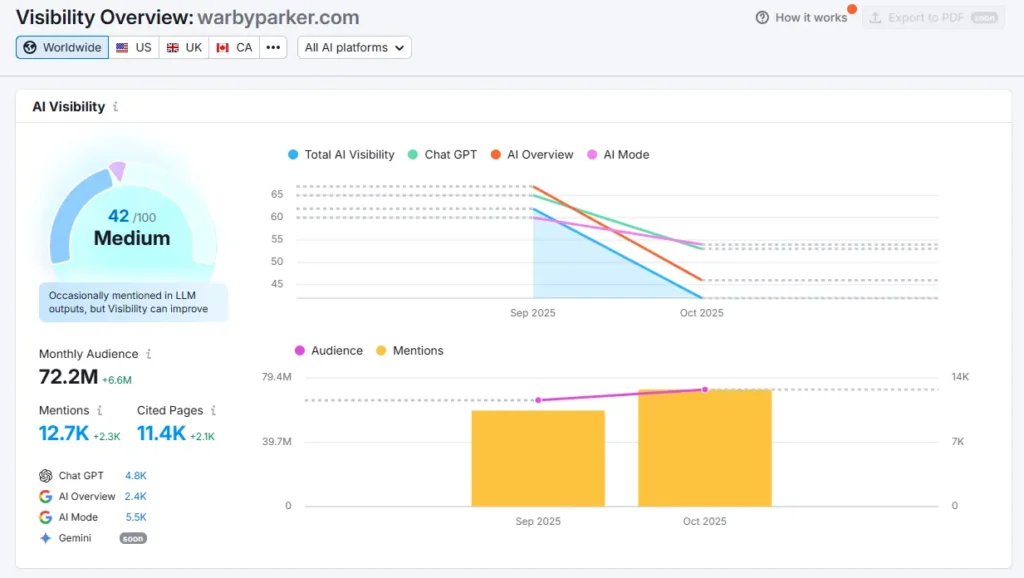
Notice how the chart separates ChatGPT (green) from the Google AI Overview (orange). This is important because these platforms function differently. You might be dominating ChatGPT because your brand has strong historical data but getting ignored by Google’s AI Overviews because your recent technical SEO is weak. Understanding how AI Overviews select their sources explains most of that gap.
Seeing these trend lines side-by-side lets you diagnose which specific algorithm is hurting you.
Mentions and Citations
Right below the audience numbers, there are two metrics that look similar but are fundamentally different: AI mentions (how often the AI names your brand) and AI citations (how often the AI links to your content).
If your mentions are high but your cited pages are low, you have a traffic problem. The AI knows who you are (good for branding), but it isn’t sending users to your site (bad for revenue). This dashboard lets you spot that gap instantly so you can focus on creating more “citable” content.”
Topics and Sources
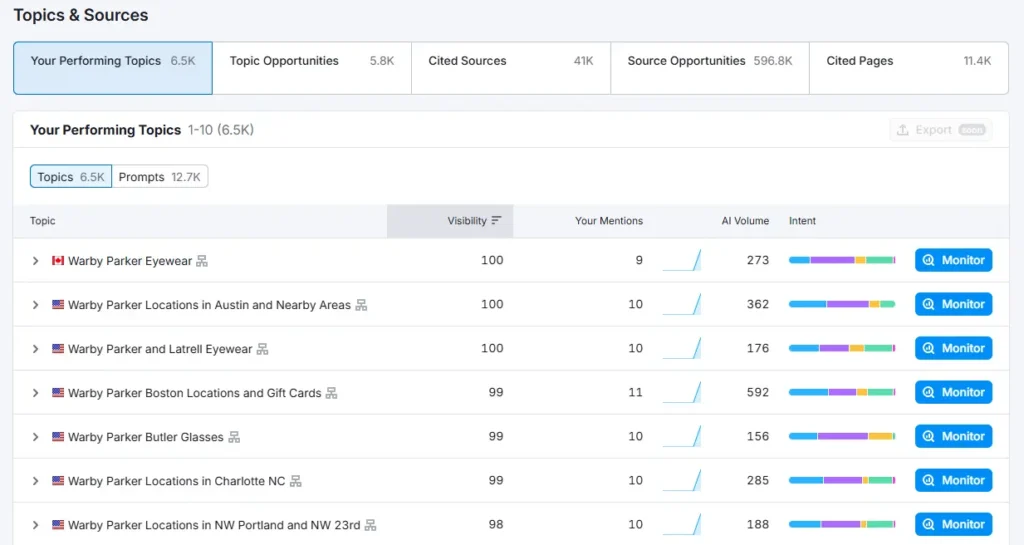
The Topics table lets you move from monitoring to strategy. Most tools just tell you if you rank, but Semrush tells you if it matters. They do this with the AI volume metric (this is a probabilistic metric estimated from clickstream data).
For example, Semrush estimates that 362 people asked AI about “Warby Parker Locations in Austin,” while only 156 people asked about “Butler Glasses.” Without this data, you might waste weeks optimizing for a prompt that nobody is using. But with it, you can prioritize your content roadmap based on actual demand inside LLMs.
Pro Tip: Look at the Intent bars (the colored line next to the volume). If you see a topic with high AI volume and a strong “Commercial” intent (yellow), that’s your “money prompt.” Double down on optimizing that specific page because the users asking that question are ready to buy.
2. Competitor Research
Semrush lets you spy on share of voice. The competitor research dashboard overlays your performance against up to 5 rivals.
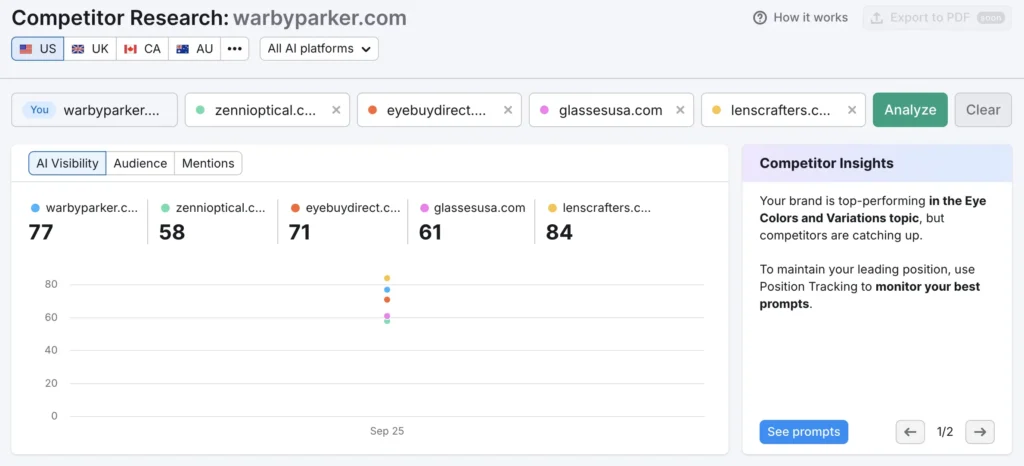
Here, Warby Parker (77) is trailing behind Lenscrafters (84) in total AI visibility.
Automated Insights
Semrush provides an automated “Competitor Insights” panel. Instead of a passive notification feed, treat this panel as an early warning system for attack vendors. It highlights specific topic clusters where your dominance is slipping and competitors are gaining ground.
→ Warby Parker, for example, is a top performer in “Eye Colors,” but the tool flags that competitors are catching up. This is a signal that their “moat” is being breached.
→ This allows them to defend their territory immediately. When they click “See prompts,” they can reverse engineer the exact questions driving their competitors’ surge and update the content before they lose the spot entirely.
Unique Tab
The competitor analysis also includes the “Unique” tab. This filter isolates prompts where only your brand appears, and your competitors are absent.
Pro Tip: In AEO vs. SEO, it’s often easier to defend a position where you’re the sole authority than to fight for a shared mention in a crowded field. The “Unique” prompts are your brand’s specific moat in the AI ecosystem.
3. Prompt Research
If you’re familiar with Semrush, you know the Keyword Magic Tool is the industry standard for finding Google keywords. Prompt Research is the exact same logic applied to LLMs. It answers the question in Generative Engine Optimization (GEO): “What are people actually asking ChatGPT about my topic?”
Instead of optimizing for keywords, you’re analyzing topics to find the specific prompts that trigger AI answers. Knowing how ChatGPT selects its sources tells you which of those prompts you can realistically win.
Estimated AI Search Volume
Usually, marketers have to guess which prompts are popular. Semrush uses clickstream data to provide an estimated AI search volume for specific queries.
This metric allows you to separate vanity metrics from actual opportunities. You might think you need to rank for “History of CRM software,” but the data might show that 10x more users are asking “Compare Salesforce vs. HubSpot pricing.”
This lets you prioritize your content roadmap based on actual user demand.
Intent Mix
The tool also breaks down prompts by intent (e.g., informational, commercial, transactional, etc.). If you’re looking for high-conversion traffic, filter for commercial intent.
These are users asking the AI to help them make a buying decision, and optimizing for these prompts yields a higher ROI than educational queries.
Competitive Intelligence
For every topic you enter, the report also lists brands most mentioned and sources most-cited. Use the sources most cited list to build your AI citation strategy.
This is your digital PR hit list. If ChatGPT cites Reddit for your topic, you need to be on Reddit. If it cites Forbes, you need a PR campaign.
4. Brand Performance
While the Visibility tool tracks volume (how much you’re seen), the Brand Performance dashboard tracks perception (how you’re understood).
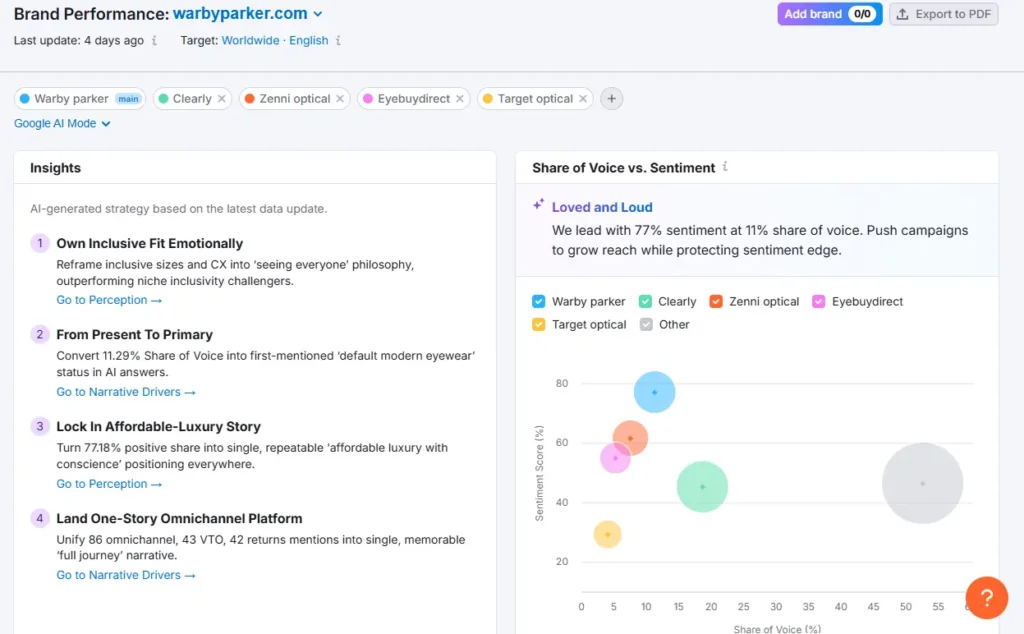
This section functions less like an SEO tool and more like a reputation management platform. It aggregates data from Perception, Narrative Drivers, and Questions to give you a view of your brand health.
Sentiment vs. Share of Voice
The sentiment scatter plot plots your brand against competitors on two axes: volume and sentiment.
Warby Parker sits in the “Loved and Loud” quadrant (high sentiment, decent volume). However, competitors like Clearly have a higher share of voice despite lower sentiment. This shows that Warby simply needs to increase their content output, not fix their reputation.
Business Drivers
If you want to know why the AI likes or dislikes you, Business Drivers holds the answer. It identifies the specific attributes LLMs associate with your brand compared to rivals.
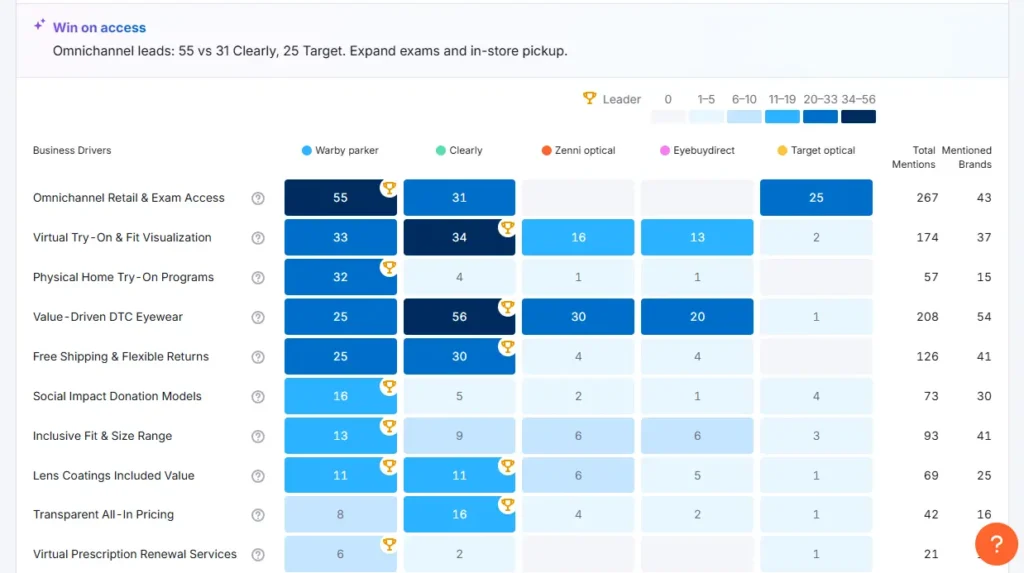
It scores you on specific drivers like “Price,” Convenience,” or “Innovation.” For example, Warby Parker scores 55 on “Omnichannel Access” but only a 25 on “Value-Driven.” If their marketing goal was to be seen as a budget option, this report proves that message isn’t sticking in the LLMs.
Narrative Drivers
Finally, the tool breaks down the intent behind your mentions using Narrative Drivers.
It separates users asking for you by name (”Warby Parker reviews”) from those asking generic questions (”Best glasses for square faces”). If you win branded search but lose non-branded, you have strong brand recognition but weak topical authority.
→ Semrush uses GenAI to synthesize this data into strategic opportunity cards. These are automated consulting notes (e.g., explicitly telling the brand to “reposition as a unified platform”) because the AI currently views their services as disconnected.
Topic and Intent Distribution
The intent distribution charts track shifts in user behavior. It visualizes if your audience is moving from informational to commercial intent.
If you see the yellow “Commercial” bar growing while your visibility stays flat, it’s a warning sign. It means users are getting closer to buying, but the AI isn’t surfacing your brand for those specific “money” questions.
5. Prompt Tracking
This tool functions exactly like classic “Position Tracking,” but for ChatGPT Search and Google AI Mode.
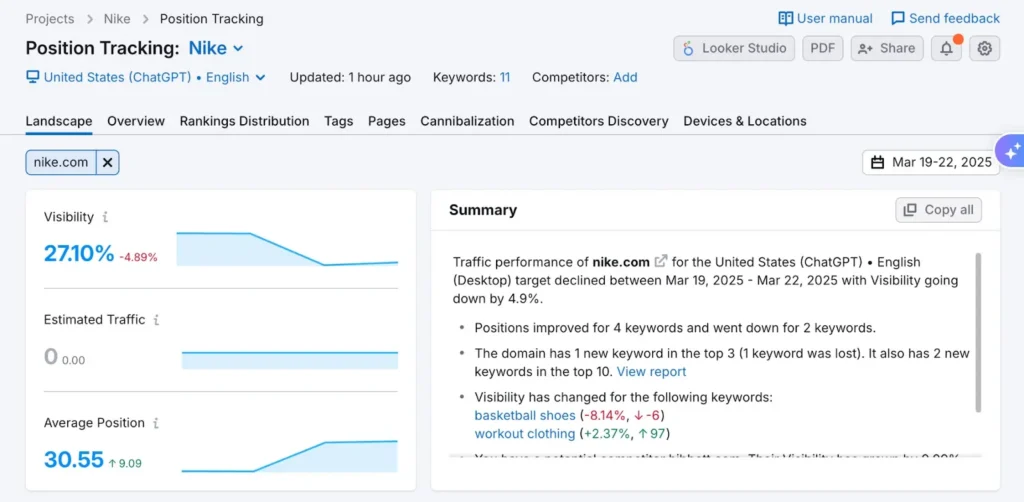
Instead of tracking blue links, it tracks citations. If your brand appears in the reference list of an AI answer, you’re “ranking.”
In ChatGPT, it scans the “Citation” area of the answer. If your link appears first in the citation list, you’re ranked #1.
In Google AI Mode, it treats the generative response as “Position 1” and the citations within it as subsequent rankings.
In the case of Nike, they appear in roughly a quarter of relevant AI answers. The graph shows a -4.89% drop. In traditional SEO, a drop usually means you lost a keyword. In AI SEO, it often means the LLM “changed its mind” or a competitor earned a citation in the answer, pushing you out of the reference list.
The most notable feature here is multitargeting. You can track the same keyword on Google vs. ChatGPT side-by-side. You might rank #1 on Google for “best running shoes” but be invisible in ChatGPT. This means that your SEO is strong, but your brand authority isn’t translating to LLMs.
Answer Snapshots
In both the Research and Tracking dashboards, you can click on any specific prompt to open an answer snapshot. This opens a pop-up showing the exact, full-text response the AI generated for that query.
→ The good news is that you see exactly how you were mentioned (e.g., a full recommendation vs. a passing footnote).
→ However, the UI is currently a bit raw. It renders a “wall of text.” Unlike the rest of Semrush, which visualizes data beautifully, here you have to manually read through AI paragraphs of AI text to find your mention. It’s functional, but not pretty.
6. Site Audit
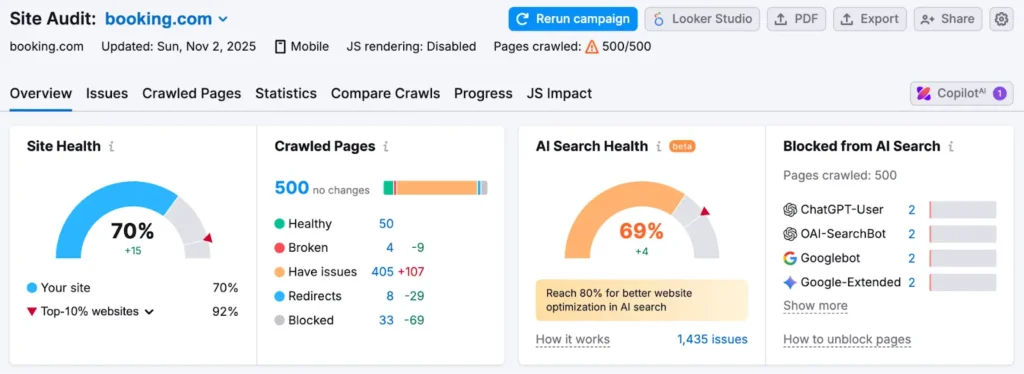
Semrush has updated its famous crawler to account for site health for Google and AI search health for LLMs.
Site Health
For traditional SEO, this remains one of the best crawlers on the market. It scans your website for over 140 technical and on-page SEO issues, including broken links, slow load times, and Core Web Vitals performance, so you can fix issues before they hurt rankings.
AI Search Health
Semrush added the new AI search category in the issues tab. It performs specific checks that standard SEO tools miss:
→ The llms.txt check, which concerns technical GEO. Just as robots.txt controls Google, this check ensures you have an llms.txt file to help AI bots understand your site structure without guessing. Most SEO crawlers ignore this file, but Semrush is one of the first to audit it.
→ The "Blocked from AI Search" panel explicitly scans your firewall for specific user agents like GPTBot, OAI-SearchBot (SearchGPT), and Google-Extended (Gemini). Unblocking Google-Extended is the prerequisite for any Gemini visibility tracker to report something useful.
→ It flags non-descriptive anchor text (e.g., “click here”) not just as an SEO error but as a “context breaker” that prevents LLMs from understanding the relationship between your pages.
This dashboard is essentially your “Go/No-Go” gauge. It proves that you can have a perfect traditional SEO score while simultaneously failing at AI readiness if your technical setup is blocking the very bots you’re trying to impress.
Semrush’s Pricing
Semrush has introduced Semrush One. This is a bundle that replaces your entire stack; it combines the traditional SEO suite with the new AI visibility features.
However, if you’re happy with your SEO tool (like Ahrefs or Moz), you can add the AI visibility toolkit for $99/mo.
Here’s how the plans compare, focusing on the metrics that matter for strategy:
Aspect/Feature | Starter | Pro+ | Advanced |
|---|---|---|---|
Pricing | $199/mo | $299/mo | $549/mo |
Best For | Freelancers/Small Sites | Growing Brands (Best Value) | Large Agencies |
Websites to Monitor | 5 | 15 | 40 |
AI Prompt Tracking | 50 prompt | 100 prompts | 200 prompts |
Google Keyword Tracking | 500 keywords | 1,500 keywords | 5,000 keywords |
Historical Data |  |  | |
JS Rendering (Site Audit) | | | |
Multi-Location Tracking | | | |
While $199 sounds like a deal for an all-in-one suite, be careful. The Starter plan lacks JavaScript (JS) rendering in the Site Audit.
If you have a modern website (React, Angular, or just heavy JS), you won’t be able to crawl it properly. You might get a “100% Health” score simply because the crawler couldn’t see the broken code hidden behind the scripts.
If you’re a serious brand, you almost have to start at Pro+ ($299) to get accurate audits and historical data.
Semrush’s AI Features: Pros and Cons
After testing the toolkit extensively, here’s where Semrush excels and where it falls short compared to specialized GEO platforms.
Pros
Unified “search” intelligence:It’s currently the only platform that allows you to overlay your Google Rankings with your ChatGPT Rankings. Seeing the “Citation Gap” (where you rank on Google but are invisible on AI) is a massive advantage.
Strategic visualizations:Semrush has always been great at visualizing data, but they have leveled up here. The sentiment scatter plot and intent distribution graphs make it incredibly easy to explain complex AI concepts to stakeholders.
Technical rigor:The AI search health audit is ahead of the curve. Including checks forllms.txtand specific bot blockers (likeGPTBot) makes it a genuine technical tool, not just a content analyzer.
Multitargeting:The ability to track the same prompt across Google, ChatGPT, and Google AI Mode side-by-side is the gold standard for hybrid reporting.
Cons
It’s “read-only”:The biggest drawback is that Semrush tells you that you’re losing, but it doesn’t give you the tactical workflows to fix it. It lacks features for schema generation, entity optimization, or direct content formatting for LLMs.
No AI traffic data (yet):In the “Prompt Tracking” dashboard, the “Estimated Traffic” metric sits at 0. Unlike their traditional SEO tools, which estimate clicks reasonably well, here you are tracking visibility, not traffic.
Interface overload:Semrush has a steep learning curve. Semrush One adds dozens of new reports to an already dense sidebar. If you’re new to the platform, the sheer volume of menus can be paralyzing.
The “Starter” plan:The $199 plan is enticing, but excluding JavaScript rendering in the Site Audit renders it useless for many modern websites.
What Customers Are Saying About Semrush
On software review sites like G2 and Capterra, Semrush scores high (4.5/5 and 4.6/5 across 2,000+ reviews, respectively).
Users generally love the product, specifically the data visualization. They note that the charts make it easy to explain complex metrics to clients, and the tool is widely considered an essential resource for marketing data.
However, the sheer number of features creates a steep learning curve. Many users find the interface cluttered and overwhelming. With the addition of the AI visibility toolkit, the dashboard has become even more crowded, which is intimidating for beginners who just want to do one specific task.
The sentiment flips on Trustpilot (2.4/5 across 1,095 reviews). Most complaints aren’t about the software but the billing. Users are frustrated with the cancellation process, unexpected charges, and unresponsive support when trying to end a subscription.
Pricing is also a common complaint. Many users feel “add-on fatigue.” The base tool is powerful, but costs stack up quickly when you have to pay for extra features like member seats and the AI toolkit.
Final Verdict: Is Semrush Worth It?
We started this Semrush review by asking if the platform’s AI features could replace dedicated GEO tools. The answer depends on whether you want to measure results or improve them.
Semrush is the best “monitoring” platform on the market. No other tool currently integrates traditional SEO and AI visibility this well. However, it’s not an “optimization” platform. It tells you that you’re invisible to AI engines, but it offers limited workflows to fix it.
If you want a single source of truth, Semrush is worth it. It replaces Ahrefs, your rank tracker, and your reputation management tool, but you’ll still need a specialized strategy to execute on the data it provides.
That’s why complementing it is best. Use Semrush to track the problem, but use a dedicated GEO platform like GetMint to improve your AI visibility.
START FREE. NO CREDIT CARD REQUIRED.
Your competitors are already visible in AI. Are you?
See what ChatGPT, Gemini and Perplexity say about your brand. Set up in 5 minutes.

