

Free AI Crawlability Checker
Many websites accidentally block AI crawlers without realizing it. Security plugins, hosting settings, and outdated robots.txt files often flag AI bots as threats, making your brand invisible in AI search results.
Our AI Crawlability Checker shows you exactly which AI bots can (and can’t) access your content in seconds.

How to Use the AI Crawlability Checker
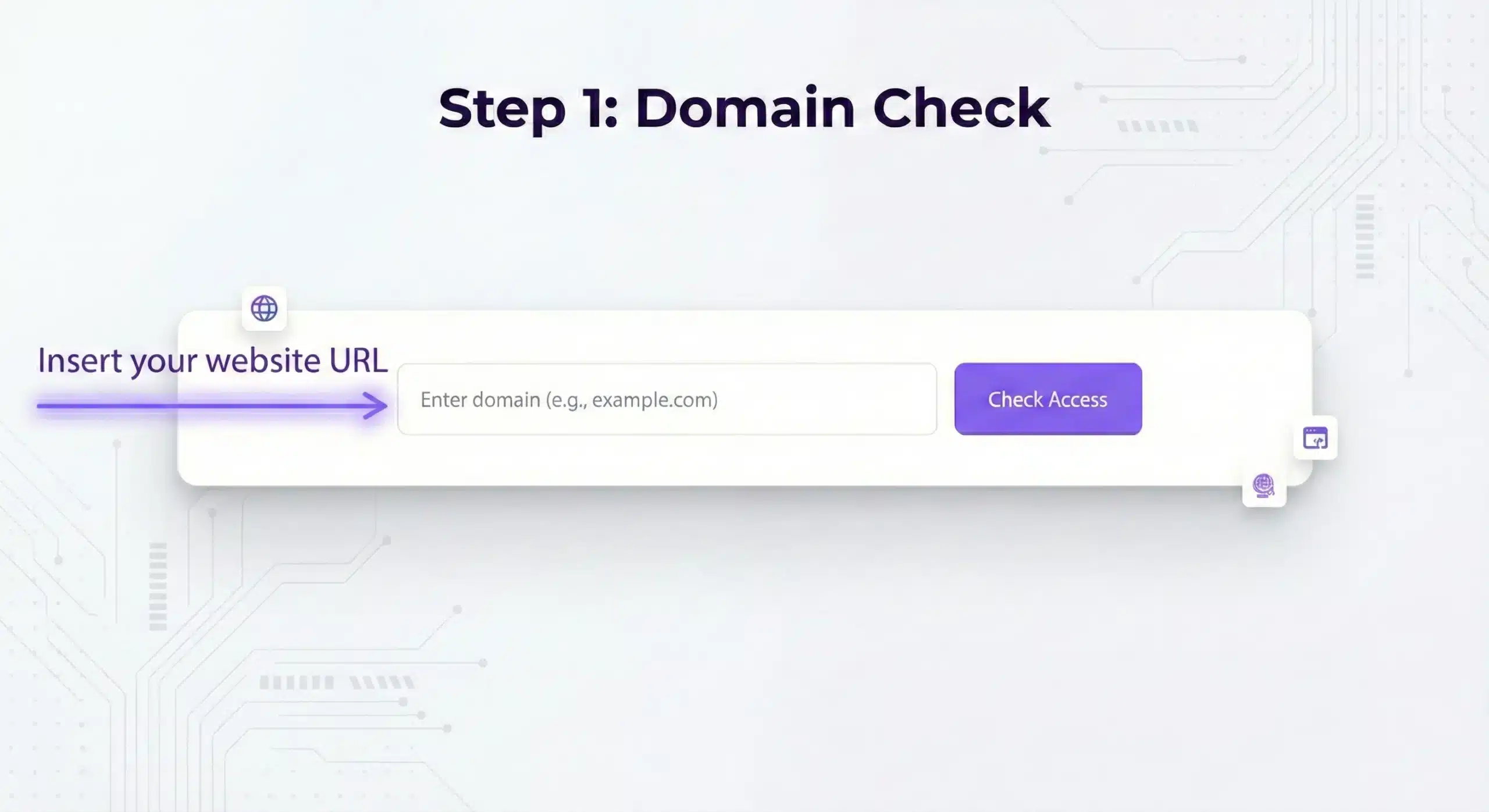
Type your website URL in the field above. You can enter the full URL (including https://) or just the domain name itself (like getmint.ai).
The tool accepts various formats:
- Full URLS: https://yourdomain.com
- Subdomains: https://blog.yourdomain.com
- Specific Pages: https://yourdomain.com/blog/article-name
- Simple Domains: yourdomain.com
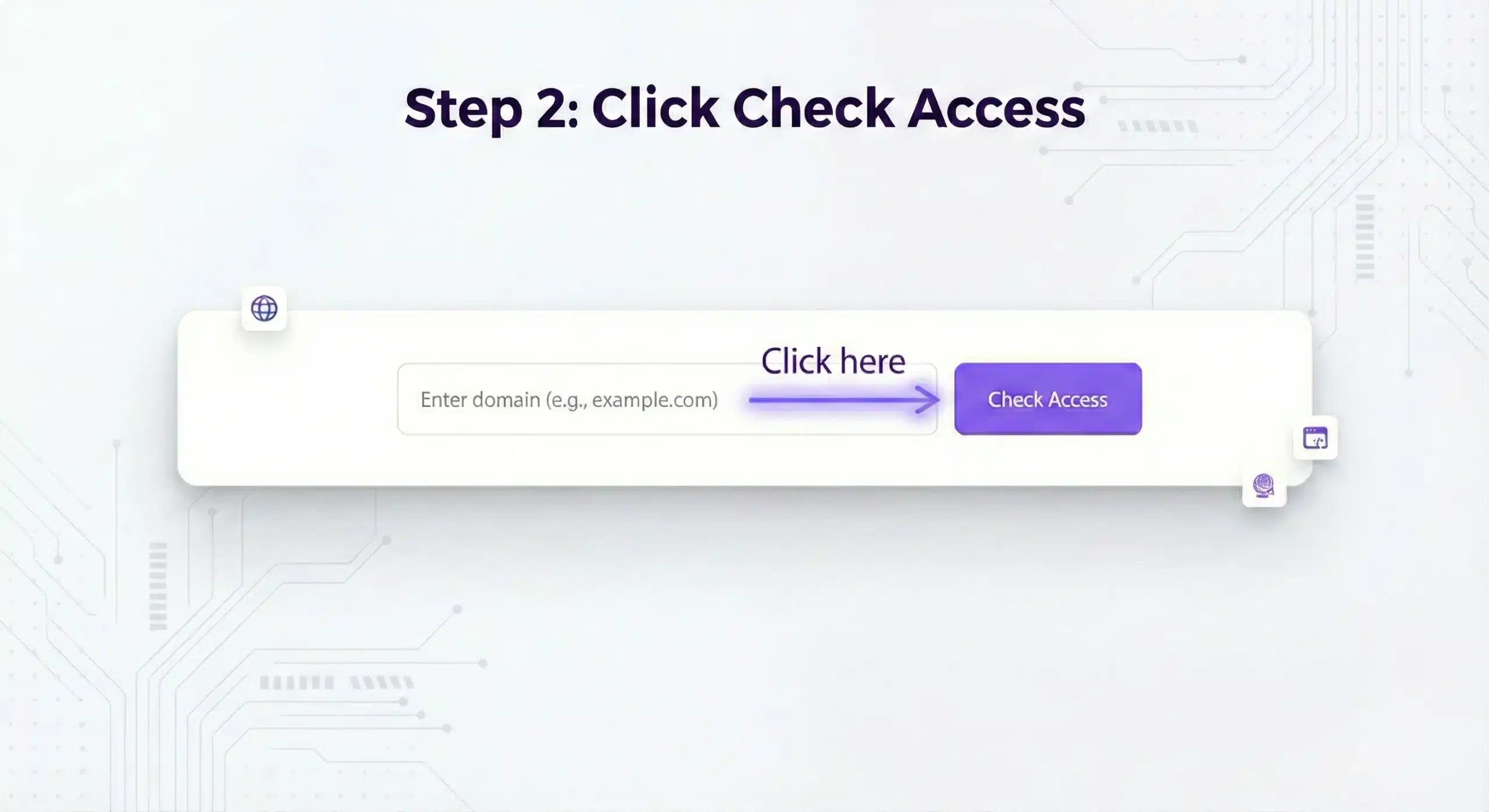
Hit the button and the tool will immediately scan your URL against 10 major AI crawler bots. The entire scan completes in less than 3 seconds.
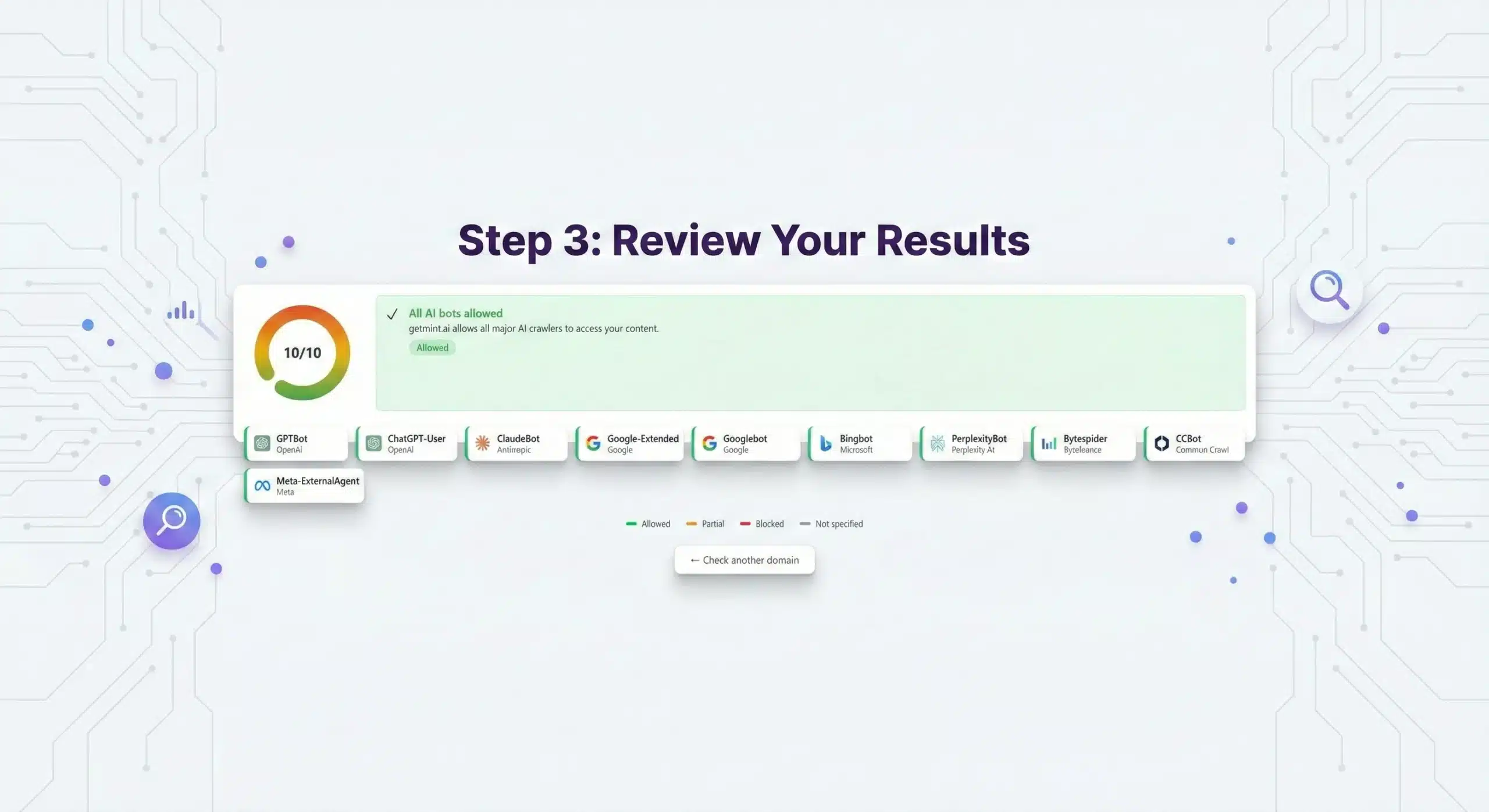
The AI crawlers the tool checks include GPTBot (ChatGPT), ClaudeBot (Claude), PerplexityBot (Perplexity), Google-Extended, Bingbot, and more.
You’ll see a score out of 10 based on how many AI bots can successfully access your page.
The tool displays both an overall score and a detailed breakdown showing the access status for each individual bot. Here’s what the color-coded results mean:
- Green (Allowed): The bot has full access to your page.
- Yellow (Partial): The bot is rate-limited or conditionally allowed.
- Red (Blocked): The bot is completely blocked by your site’s configuration.
- Gray (Not Specified): The bot isn’t mentioned in your robots.txt file (default = allowed).
Why Does Checking AI Bot Crawlability Matter?
AI search engines like ChatGPT and Perplexity fundamentally operate differently than traditional search engines. Instead of showing a list of blue links, they synthesize answers by crawling sites in real-time, extracting relevant facts, and presenting them conversationally.
If AI crawlers can't access your content, you won't be cited — no matter how good it is.
Most blocks are completely accidental. Very few businesses intentionally block AI crawlers. In most cases, the blocking happens because:
- Security plugins like Wordfence, Sucuri, or Cloudflare flag AI bots as “suspicious traffic” by default.
- Hosting providers have aggressive bot-blocking rules to prevent DDoS attacks.
- Outdated robots.txt files were written before AI crawlers existed and accidentally deny access to new user agents.
- CDN configurations rate-limit AI bots more aggressively than traditional search engines.
The worst part is that you won’t know it’s happening unless you actively check. Unlike Google Search Console, there’s no official dashboard from OpenAI or Anthropic telling you if their bots are being blocked. You’d need a technical AI visibility platform, like Scrunch AI, to monitor this continuously.
Why AI Bot Crawlability Is Your Foundation

Even if you’ve implemented advanced strategies like structured data, semantic SEO, or an llms.txt file to guide AI crawlers to your best pages, none of it matters if the bots are blocked at the door.
Here’s a simple analogy: you can’t get cited in a research paper if the researcher was never allowed into the library. Crawlability is the foundation. Everything else (optimization, content quality, and authority) comes second.
The good news is that different AI bots have different levels of impact on your visibility, and some of them aren’t blocked by default.
The distinction matters: Blocking Google-Extended stops your content from training Google's AI models, but your site still appears in regular search results and Google AI Overviews. It's a content ownership decision, not an SEO one.
What Happens After You Fix Crawlability?
Getting a 10/10 crawlability score is just the beginning. Once AI bots can access your site, the next step is making sure they understand and cite your content correctly.
After fixing crawlability, consider:
- Implementing an llms.txt file to guide AI crawlers to your best content. This acts like a roadmap that points bots directly to your most important/best pages (pricing, features, documentation, and pillar content) instead of letting them guess.
- Optimizing content for AI search by cleaning up your content structure, using semantic HTML, and making your pages easier for AI to parse and understand.
- Creating a comprehensive Generative Engine Optimization (GEO) strategy to systematically boost your AI search visibility across multiple platforms.
- Monitoring your AI search visibility with GEO tools to track which queries trigger citations of your brand and how often you appear in AI responses.
Common Issues and Quick Fixes


If AI bots are blocked from crawling, your brand’s AI visibility declines. You become invisible in the very platforms where millions of users are now conducting research and making decisions.
Here are the most common issues that prevent AI crawlers from accessing websites, along with actionable solutions:
Issue 1: Security Plugin Blocking Bots
If specific bots are blocked while others work fine, it’s likely that your robots.txt file contains explicit “Disallow” rules for AI user agents, either added manually in the past or inserted by a plugin.
Navigate to yourdomain.com/robots.txt in your browser to view your current file.
Look for lines like:
Delete these rules entirely, or change Disallow: / to Allow: / to explicitly permit access.
If you want granular control, like blocking AI training (Google-Extended) while allowing AI citations (GPTBot, ClaudeBot, and Googlebot), your robots.txt file should look like this:
Issue 2: Robots.txt Blocking
If multiple bots show as “Blocked” (red status) with 403 forbidden errors, it’s likely that your security plugins are treating AI bots as potential threats because they’re relatively new and weren’t included in older allowlists.
Log into your security plugin dashboard (Wordfence, Cloudflare, Sucuri, etc.) and navigate to the Firewall or Bot Management section. Add explicit exceptions for these user agents:
If you use Cloudflare specifically, go to Security → Bots and ensure “AI Scrapers” are set to “Allow” rather than “Block” or “Challenge.”
Issue 3: Server-Level Rate Limiting
If your bots are marked as “Partial” (yellow status) or return 429 (Too Many Requests) errors, your web server or CDN is rate-limiting AI crawlers more aggressively than normal traffic, either as a blanket policy or because AI bots are flagged as high-frequency scrapers.
Contact your hosting provider’s support team and ask them to whitelist the following AI bot user agents:
If you use a CDN like Cloudflare, Fastly, or KeyCDN, log into your dashboard and adjust the rate-limiting rules to create exceptions for these specific bots.
Some hosting providers (WP Engine, Kinsta, Flywheel, etc.) have built-in AI bot management settings; check your dashboard for these options.
Issue 4: JavaScript-Heavy Sites

If your crawlability score is 10/10 but AI engines still don’t cite your content in their responses, it’s likely that your site relies heavily on JavaScript to render content.
Many AI bots don’t execute JavaScript (or execute it with limitations), so they see an empty or incomplete page even when technically “allowed” to access it.
This is a more technical issue that requires code changes. Here are three fixes:
- Implement server-side rendering (SSR) so content is delivered as HTML before JavaScript runs.
- Use static site generation (SSG) for your most important pages.
- Provide a text-only version of your content through llms.txt files that link to clean Markdown (.md) versions of your pages.
If you’re on WordPress or a traditional CMS, this usually isn’t an issue. But if you use a modern JavaScript framework like React, Vue, or Angular without SSR, AI bots might struggle to read your content even when they’re allowed access.
AI Search Is the New Gatekeeper of Discovery
If you’re invisible in AI answers, your competitors are capturing customers you’ll never reach.


What happens if you ignore AI search
Risk of being invisible
When prospects ask AI "What's the best [your category]?", your competitors appear in responses while you don't exist.
Speed of market shift
Every day you're not visible in AI search, your competitors capture qualified prospects who will never discover you.
Data blackbox
You have no visibility into how AI models perceive your brand, what they say about you, or when they recommend competitors instead.
Revenue leakage
50% of your potential customers are using AI to research purchases. If you're invisible there, you're losing half your market.


Ready to turn AI search into growth?
Frequently Asked Questions

A 10/10 score means all major AI bots can access your page without restrictions. However, this doesn't automatically guarantee AI citations, as content quality, relevance, topical authority, and how well your content answers user queries still matter significantly.
Think of crawlability as the entrance requirement. A 10/10 score means you're allowed to compete for citations. But winning those citations requires strong content that AI models find valuable and trustworthy.

This is a business decision, not a technical requirement. Some companies block Google-Extended (which feeds Google's Gemini AI training data) while still allowing GPTBot and ClaudeBot (which power AI search citations).
Publishers concerned about their content being used to train AI models often block Google-Extended. Blocking Google-Extended won't hurt your traditional search rankings or your appearance in Google AI Overviews, since those use standard Googlebot.

Run a crawlability check whenever you:
- Change hosting providers
- Install or update security plugins
- Modify your robots.txt file
- Launch a major site redesign
- Notice drops in AI mentions or brand citations.
As a baseline, quarterly checks are recommended since AI bot user agents evolve, new crawlers emerge, and security rules can change with plugin updates.


- Plugin settings (if you use WordPress or similar platforms)
- Editing robots.txt (which is just a simple text file you can modify in any text editor)
- CDN dashboards (if your blocking issue is at the CDN level)
